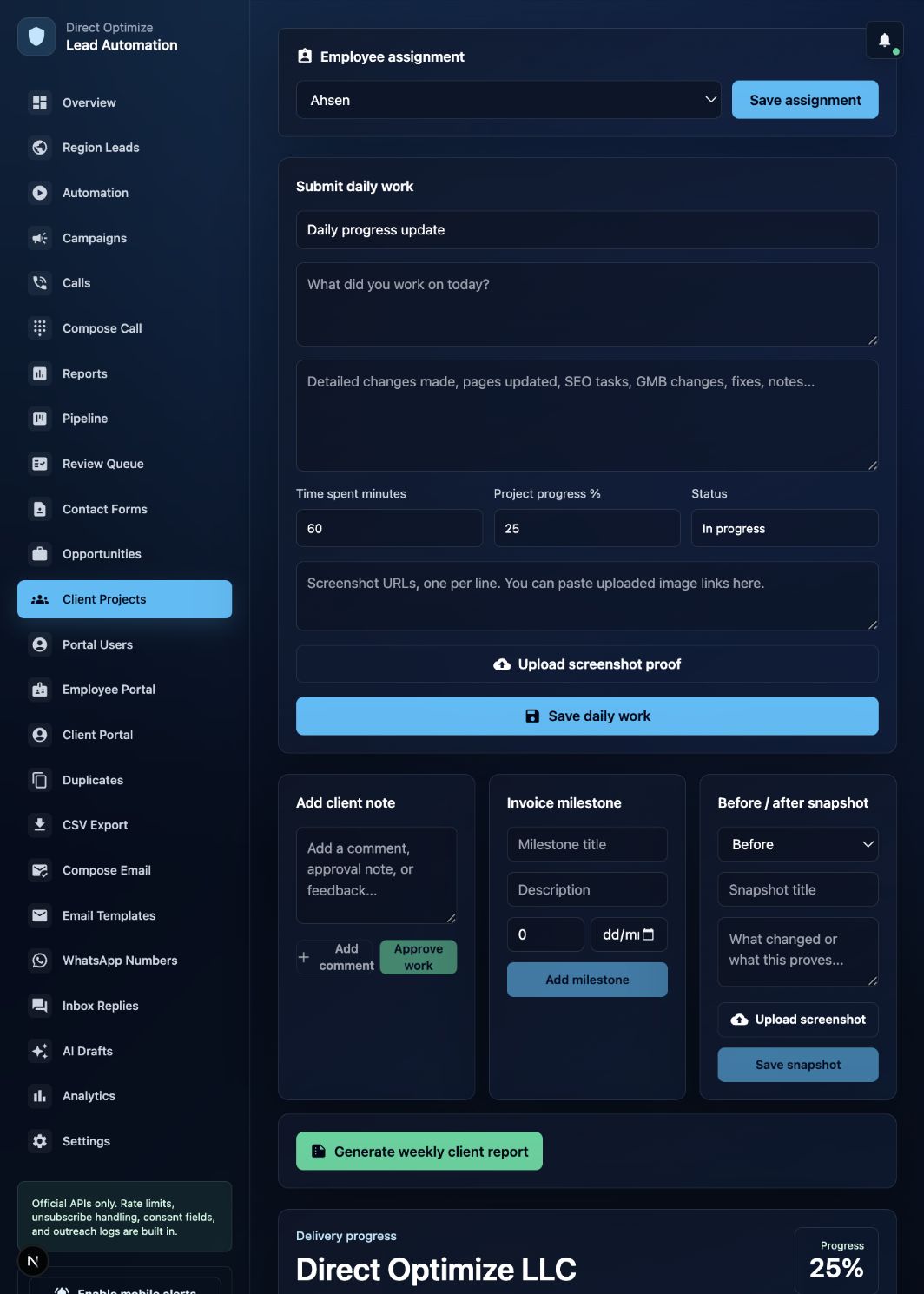
Direct Optimize client portal

Your project.
Visible every day.

A transparent workspace for website development, SEO, and Google Business Profile work. See your specialist, daily updates, time spent, screenshots, milestones, and results in one place.

Direct Optimize client portal showing delivery progress, hours and daily work Add comment Approve work Upload screenshot Generate report Delivery progress
Your live project dashboard — view real-time progress, tracked hours, daily submissions, and assigned specialist activity all in one unified interface.

One workspace for your complete delivery journey

Daily progress Assigned specialist Time tracking Screenshot proof Client comments Milestones Weekly reports Live notifications
Services built for accountable delivery

Everything you need to
follow the work.

Your portal turns every service into a clear, reviewable workflow instead of a collection of scattered messages. No more digging through emails or waiting for status calls.

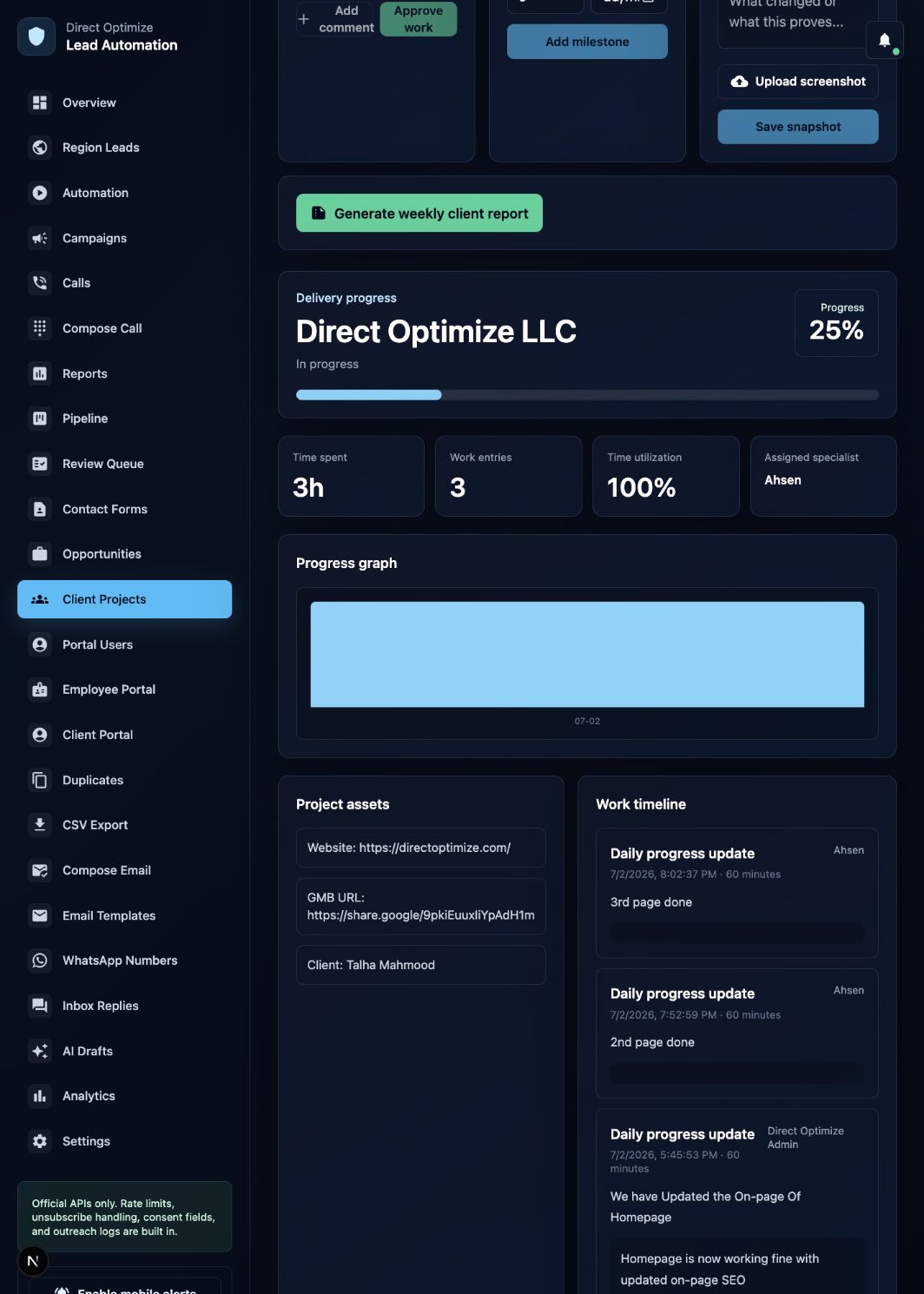
Direct Optimize project progress dashboard showing percentage completion, time graphs, and daily work timeline Progress % Time graph Daily timeline
Interactive progress dashboard with visual completion percentage, utilization graphs, and a chronological timeline of all submitted work entries.
Client workspace

Progress you can inspect

Hours, entries, utilization, specialist, graph, assets, and daily timeline.

01

Website delivery

Track pages, fixes, design changes, development work, and before/after proof. See exactly which pages were updated, what code was changed, and view timestamped screenshots of every modification.

02

SEO progress

See on-page changes, content work, audits, technical fixes, and time invested. Monitor keyword movements, meta updates, backlink acquisition, and content publication schedules with full transparency.

03

GMB optimization

Follow profile updates, local visibility improvements, and supporting evidence. Track post frequency, photo uploads, review responses, and category optimizations with visual proof of changes.

04

Project communication

Comment directly on submitted work and keep every decision attached to the project. All feedback is threaded to specific work entries, creating a permanent record of approvals and change requests.

Built to perform

Clarity that keeps work moving.

The portal gives every person the right view, reducing delays and making progress easier to understand. Clients see approved progress. Employees see their daily workspace. Admins see quality control metrics.

24/7project visibility
Dailyemployee updates
Livenotifications
Onesource of truth
Everything you need

To grow online.

Built around the real questions clients ask: What changed today? Who is working? How much time was spent? What happens next? Every feature answers these questions with data you can verify.

Delivery progress

A visual percentage and graph show how the project is moving. Color-coded status indicators reveal at a glance whether work is on track, pending review, or awaiting your feedback.

Daily timeline

Every submitted update includes work details and its author. Scroll through a chronological feed of all activity with timestamps, descriptions, and attached screenshots for complete context.

Time spent

See recorded minutes and total project hours. Time entries are tied to specific tasks so you understand exactly how resources are allocated across website work, SEO, and GMB optimization.

Screenshot proof

Review visual evidence of completed changes. Before-and-after captures, live site screenshots, and annotated images provide concrete proof that work was performed as described.

Assigned employee

Know exactly who is responsible for your project. View specialist profiles, contact details, and their complete work history on your account for direct communication when needed.

Client comments

Leave feedback for the employee and admin team. Comments are threaded to specific work entries, creating an organized conversation history that never gets lost in email threads.

Reports

Receive structured weekly progress summaries. Automated reports compile all completed work, time totals, milestone achievements, and upcoming priorities into a shareable PDF format.

Mobile access

Check updates and notifications wherever you are. The responsive portal works on any device, with push notifications alerting you the moment new work is submitted or milestones are reached.

Built with purpose

Designed to last.

Your employee has a focused daily workspace. Direct Optimize reviews the delivery. You see the approved progress without chasing anyone. The system creates accountability at every level.

  • Employee assignment Named responsibility
  • Daily work submission Structured detail
  • Admin review Quality control
  • Client visibility Transparent progress
  • Comments and approvals Shared decisions
Direct Optimize employee daily work submission workspace showing task list, time tracker, and screenshot upload interface Task list Time tracker Submit work
The employee workspace where specialists log hours, describe completed tasks, upload proof screenshots, and submit structured daily updates for admin review.
Industries we serve

Different businesses.
One clear process.

The system adapts to the service your business needs while preserving the same visibility and accountability. Whether you run a single-location shop or a multi-site enterprise, the portal scales to match your complexity.

Local businesses

Google Business Profile, local SEO, reviews, and location visibility. Perfect for restaurants, salons, clinics, and shops that need to dominate local search results and map packs.

Professional services

High-trust websites, lead journeys, content, and search performance. Ideal for law firms, accountants, consultants, and agencies that convert visitors through authority and credibility.

Healthcare practices

Clear service pages, local presence, conversion work, and reporting. Designed for dentists, physicians, therapists, and clinics that need HIPAA-aware digital presence with patient-friendly navigation.

Home services

Location coverage, calls, quote journeys, maps, and local rankings. Built for plumbers, electricians, HVAC, landscaping, and contractors who win customers through emergency and scheduled service visibility.

Retail and ecommerce

Product experience, technical improvements, content, and campaigns. Supports product catalogs, inventory integration, checkout optimization, and seasonal campaign tracking with full transparency.

Growing companies

Custom software, dashboards, multi-site work, and digital operations. For businesses scaling beyond basic websites into complex digital ecosystems requiring coordinated team delivery.

Work with a team that shows the work, not only the outcome.Register now →
How much could clear delivery improve your project?

Measure the work.
Understand the value.

Progress is supported by time records, completed entries, visual proof, and a specialist you can identify. No more guessing whether your retainer is being used effectively — the data tells the complete story.

Example project progress25%

Updated as approved work is submitted. The percentage reflects actual completed and verified tasks, not estimates or promises.

Tracked delivery time3h

Recorded against detailed work entries. Every minute is accounted for and tied to specific deliverables you can review and verify.

Loved by informed clients

Trust grows when
the work is visible.

The system is designed around the transparency clients expect from a modern digital partner. These are the real benefits our clients experience when they can see, verify, and respond to work as it happens.

TRANSPARENCY

“I can open one page and understand the project without waiting for a meeting. The dashboard gives me everything — progress, time, who did what, and what is next. I check it over coffee.”

Client portal experience
ACCOUNTABILITY

“Every update shows the employee, time spent, changes made, and progress. I know exactly who worked on my site yesterday and what they accomplished. That level of detail is rare.”

Structured daily delivery
PROOF

“Screenshots and detailed notes make it easier to review what actually changed. I can compare the before and after images side by side and approve work without second-guessing.”

Evidence-led reporting
COMMUNICATION

“Comments stay connected to the work, so feedback does not disappear in chat. When I ask for a revision, it is attached to the specific task. Six months later, I can still find that conversation.”

Client collaboration
MOBILITY

“I can follow updates and receive notifications even when I am away from my desk. Between meetings, I check the portal on my phone and stay informed without interrupting my day.”

Mobile-ready access
CONTROL

“Direct Optimize reviews the delivery while I keep a clear view of the outcome. I do not need to micromanage because the system already ensures quality before I even see the work.”

Admin oversight
A process built for results

Register. Connect.
Follow the progress.

Creating your portal is simple, and your profile can grow with additional websites and Google Business Profile links. Most clients are fully set up and viewing their first work entries within 48 hours of registration.

01

Create your account

Add your company, contact details, region, and secure login. The registration takes under three minutes and requires only basic business information to get started.

02

Connect your properties

Submit your website and Google Business Profile URLs. You can add multiple properties during setup or return later to expand your portfolio as your business grows.

03

Project setup

Direct Optimize reviews the information and creates the delivery workspace. Our team configures your portal, assigns the appropriate service categories, and prepares the tracking structure.

04

Specialist assignment

An employee is assigned and begins submitting structured daily work. You will receive a notification when your specialist is active and their first work entry is ready for review.

05

Track and respond

Follow progress, receive notifications, and comment on completed work. Your daily routine becomes checking the portal, reviewing submissions, and leaving feedback — all in one place.

Direct Optimize client project timeline and performance graph showing weekly progress bars, milestone markers, and utilization metrics Progress bar Milestone marker Utilization
A sample client view showing the weekly performance graph, milestone completion markers, and time utilization breakdown across website, SEO, and GMB services.
Your portal starts here

Register in minutes.
Stay informed every day.

Share the essentials now. You can update your profile and add more websites or Google Business Profile links later. There is no commitment required to create your account and explore the portal.

Company name
Your name
Email address
Phone number
Website URL
Google Business Profile URL
Create your client portal →
FAQs

Questions, answered.

You can see project progress, assigned specialist, total time, daily work entries, screenshots, assets, comments, milestones, and reports. The dashboard provides a complete overview while individual sections let you drill into specific details like time allocation, completed tasks, and visual proof of changes.
Yes. Open your client profile after registration to update your details and add additional website or Google Business Profile links. There is no limit to the number of properties you can track, and each one gets its own dedicated workspace and progress tracking.
Yes. The system supports live portal updates and mobile notifications when supported and enabled on your device. You will be alerted when work is submitted, milestones are reached, comments are added, and weekly reports are generated. You control which notifications you receive and how.
Yes. Client comments are visible to the assigned employee and Direct Optimize admin team, keeping feedback attached to the project. Your comments are threaded to specific work entries, creating an organized history of feedback, approvals, and revision requests that never gets lost.
Yes. The portal is responsive and includes mobile navigation, install support, and notification controls. It works on iOS and Android browsers, and you can add it to your home screen for quick access. All features — viewing, commenting, and downloading reports — work seamlessly on mobile.
The Direct Optimize standard

We do not just promise.
We document the progress.

WITHOUT VISIBILITY

Work feels uncertain.

Updates are scattered across emails, Slack threads, and phone calls. Time is unclear — you do not know if your retainer hours were used this week. Screenshots are missing or arrive days late. Clients must chase the team for answers, creating friction and doubt about whether work is actually happening.

WITH DIRECT OPTIMIZE

Every step has context.

The specialist, work, time, proof, comments, reports, and progress remain connected in one transparent workspace. You see daily updates as they happen, verify work through screenshots, track time against deliverables, and communicate without leaving the platform. Accountability is built into every interaction.

Ready to work with a team that keeps you informed?

Create your portal →